

Description
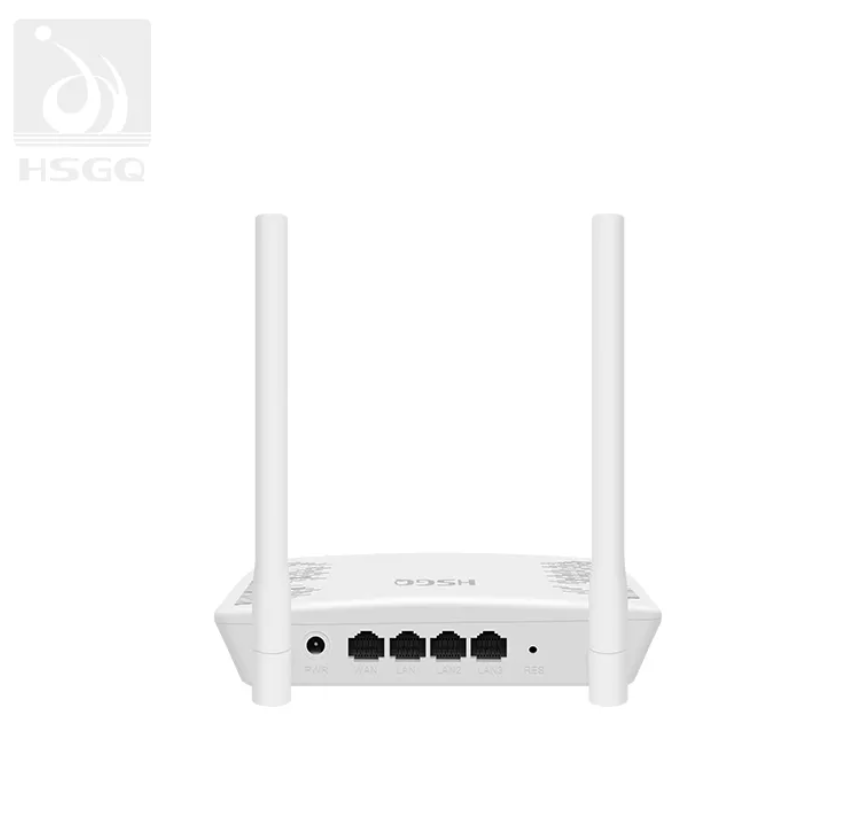
N300 dual band router wireless modem
Strong Stability: WiFi 4 uses MIMO technology, which can effectively overcome wireless signal interference and improve the stability of network connections.
Wide Coverage: Through beamforming technology, WiFi 4 routers can concentrate wireless signals in a specific direction, thereby expanding coverage.
Value: WiFi 4 routers are relatively cheap and are a good choice for users with limited budgets.
Good Compatibility: Can be connected to various wireless devices.
Applicable Scenarios: Ordinary home users/small offices.
- Model:
HSGQ-R300
The R300 wireless device uses the 2.4GHz frequency band, which has a better ability topenetrate walls than 5.8GHz and provide a wider coverage area. The 300Mbps wireless transmission rate can fully utilize 100M and below broadband to ensure a smooth network experience.
| Master | FLASH / Memory | 4MB Flash/32 DDR | ||
| WiFi | 2.4GHz | |||
| Antenna | 2.4G: 2T2R 3dBi | |||
| Port | 4*10/100Mbps RJ45(WAN*1+LAN*3) | |||
| Button | WPS/RESET | |||
| Power Supply | DC 12V/1A | |||
| Wireless | Frequency Range | 2.4~2.4835GHz | ||
| Wireless Rate | 11b: 1/2/5.5/11Mbps 11g: 6/9/12/18/24/36/48/54Mbps 11n: up to 300Mbps |
|||
| Working Channel | 2.4G: 1~13 | |||
| Spread Spectrum Technology | DSSS (Direct Sequence Spread Spectrum) | |||
| Data Modulation Method | 802.11b: DSSS (DQPSK, DBPSK, CCK) 802.11g: OFDM (BPSK, QPSK, 16-QAM, 64-QAM) 802.11n: OFDM (BPSK, QPSK, 16-QAM, 64-QAM) |
|||
| Medium Access Protocol | CSMA/CA with ACK | |||
| Data Encryption | WPA-PSK/WPA2-PSK、WPA/WPA2 | |||
| Power (standard power) | 2.4G: 11b: 16dBm ± 2dBm@11Mbps 11g: 15dBm ± 2dBm@54Mbps 11n: 14dBm ± 2dBm@MCS7 |
|||
| Receiving Sensitivity | 2.4G: 11b: <-87dbm@11Mbps 11g: <-71dbm@ 54Mbps11n (HT20): ≤-68dBm@MCS7 11n (HT40): ≤-65dBm@MCS7 |
|||
| Button | Reset Button | 1*reset button, long press for 5 seconds to restore factory settings | ||
| WPS | Short press to turn on | |||
| LED Lights | POWER | Power indicator, blue indicator is always onwhen power is connected | ||
| WAN | The WAN is connected to the network cableand the network cable is normal, and the blueis always on. When there is data transmissionthe WAN indicator flashes blue | |||
| LAN | LAN is connected to the network cableand the network cable is normal, and theblue light is always on; when data is beingtransmitted, the LAN indicator flashes blue | |||
| WiFi | Wireless indicator light (always on, datatransmission flashes) | |||
| Network Status | Always on with internet access, data flashing | |||
| Environmental Standards | Operating Temperature: -5°C~55°C | |||
| Storage Temperature: -20°C ~ 60°C | ||||
| Working Humidity: 10%~90% | ||||



There are no reviews yet.